Getting Started BBCSO Discover - Reaper
Getting Started: BBCSO Discover - Reaper
- Table of Contents
Overview:
While Reaper tends to be a little bit more of the tinkering musician’s DAW, often a little bit of tinkering yields some pretty hefty workflow enhancement. In this case, taking a little bit of time to configure a few extensions turns Reaper into an awesome DAW for creating orchestral music.
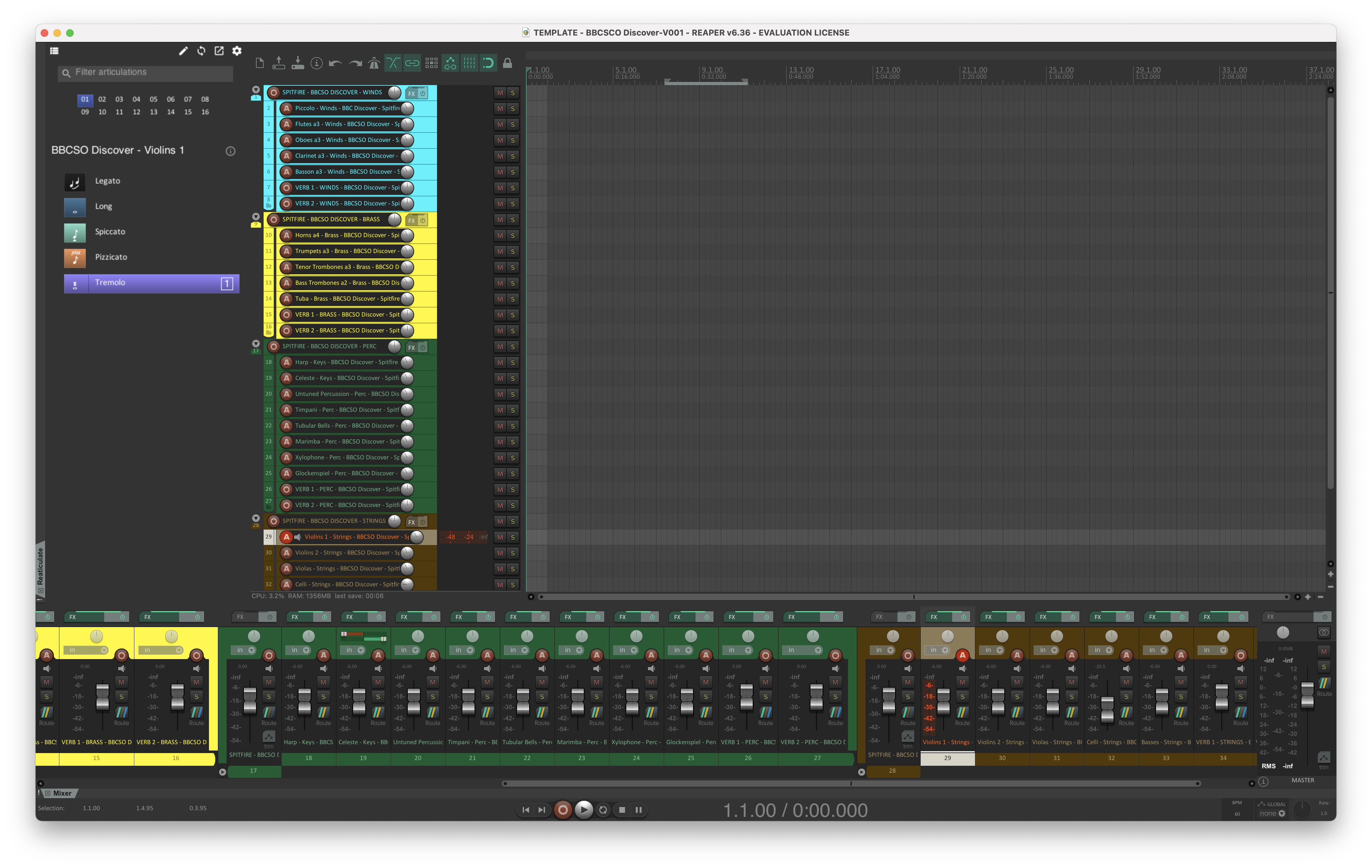
Installation & Configuration:
Reaper
First make sure that you have installed the latest version of Reaper.
SWS Extension
The SWS Extension is a set of user-created add-ons that extended and enhance the functionality of Reaper.
Installation
- Quit Reaper.
- Download the correct version of the SWS Extension for your operating system.
- Open the downloaded content and follow the included installation instructions.
- Restart Reaper.
You can approve each file by right-clicking on it and selecting “Open.” You then will see a pop-up notification asking if you would really like to open this file, click “Open” or “Yes.”
ReaPack
ReaPack is a package manager for Reaper extension. It can be used to discover, install, and update Reaper resources including ReaScripts, JS effects, extensions, themes, language packs, templates, web interfaces, and more.
Installation
-
Quit Reaper.
-
Download the correct version of ReaPack for your operating system.
-
From the
Menu BarinReaper click Options > Show REAPER resource path in explorer/finder -
Then move the downloaded file into the
User Pluginsfolder.📝 Note
You can approve the file by right-clicking on it and selecting “Open.” You then will see a pop-up notification asking if you would really like to open this file, click “Open” or “Yes.”
- Restart Reaper.
- After restarting Reaper, you should see a window confirming that you have successfully installed ReaPack.
JS_ReaScriptAPI Extension
With the ReaPack Package Manger freshly installed, it can now be used to install the js_ReaScriptAPI extension. This extension works as a facilitator/connector for some of the more advanced functionality of the Reaticulate Extension which will be installed next. More information about this Reaper Extension can be found on the project’s forum thread: https://forum.cockos.com/showthread.php?t=212174
Installation
-
From Reaper’s
Menu Bar, navigate toExtension > ReaPack > Browse Packages.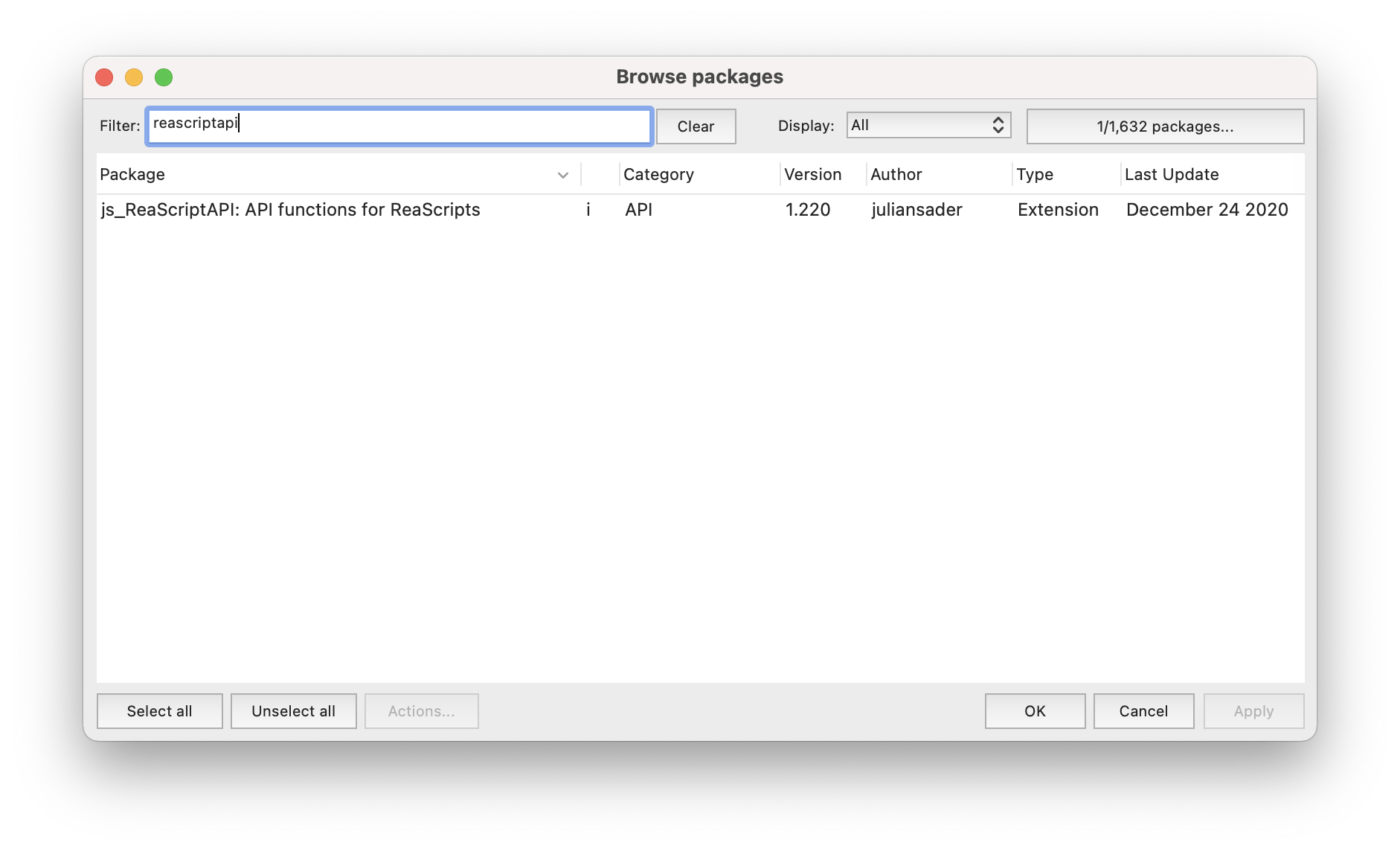
-
Then Filter for “reascriptapi”
-
Right click on the
js_ReaScriptAPI: API functions for ReaScriptsand chooseInstall. -
Then click the
Applybutton in the bottom right corner of theBrowse Packageswindow. -
You may now close, the
Browse Packageswindow and restart Reaper
Reaticulate
Reaticulate provides a virtual instrument articulation management system for Reaper. More information about this Reaper Extension can be found on the project’s website: https://reaticulate.com/
Installation
-
In Reaper’s
Menu Barnavigate toExtensions > ReaPack > Import Repository -
In the Import Repositories window that appears, paste in this URL and click “OK”:
https://reaticulate.com/release.xml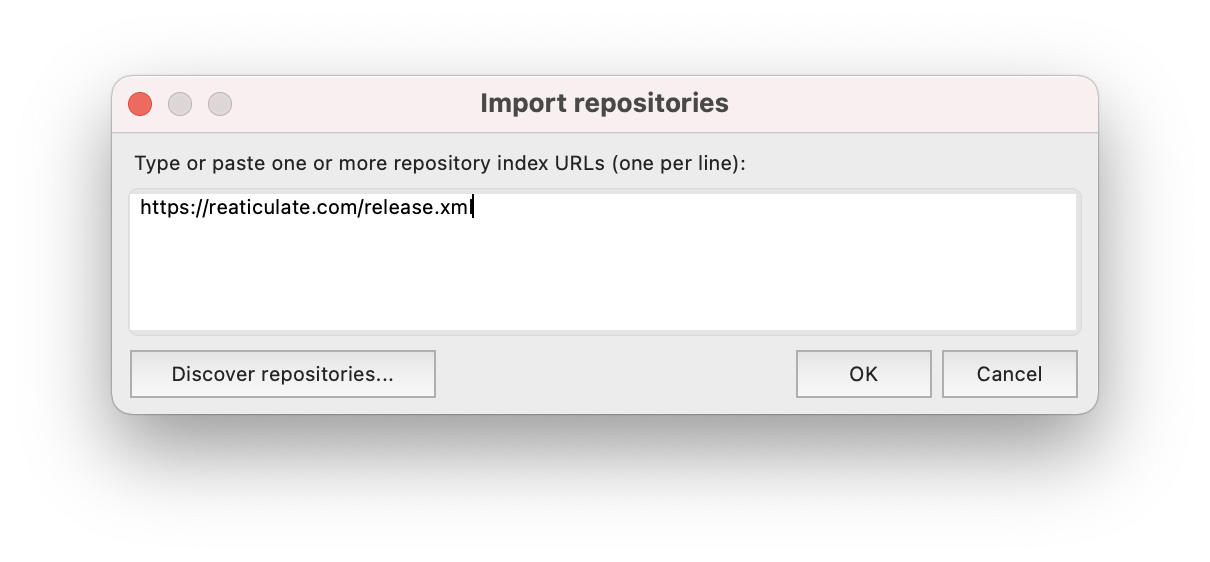
-
Back in Reaper’s
Menu Bar, navigate toExtension > ReaPack > Browse Packagesand filter for “Reaticulate”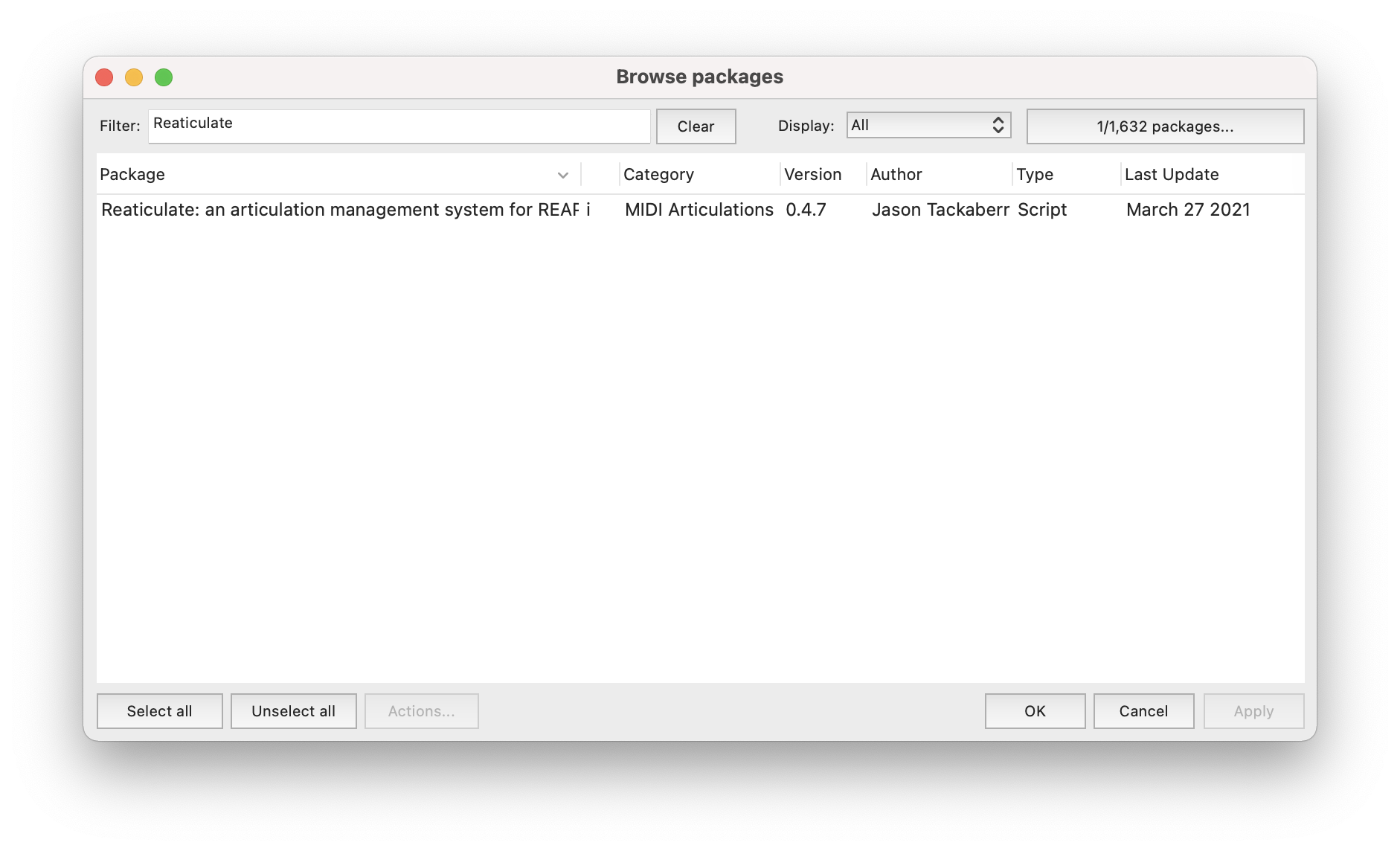
-
Once found, right-click on the
Reaticulate: an articulation management system for Reaperpackage and chooseInstall. -
Then click the
Applybutton in the bottom right corner of theBrowse Packageswindow. -
You may now close, the
Browse Packageswindow and restart Reaper
Reaticulate Setup
Before we can begin to use Reaticulate to control all the articulations included in each of the BBCSO Discover instruments, we’ll need to edit Reaticulates preferences file.
-
Begin by open the main Reaticulate window via Reaper’s
Actions Listfound in Reaper’sMenubar > Actions > Show Actions List... -
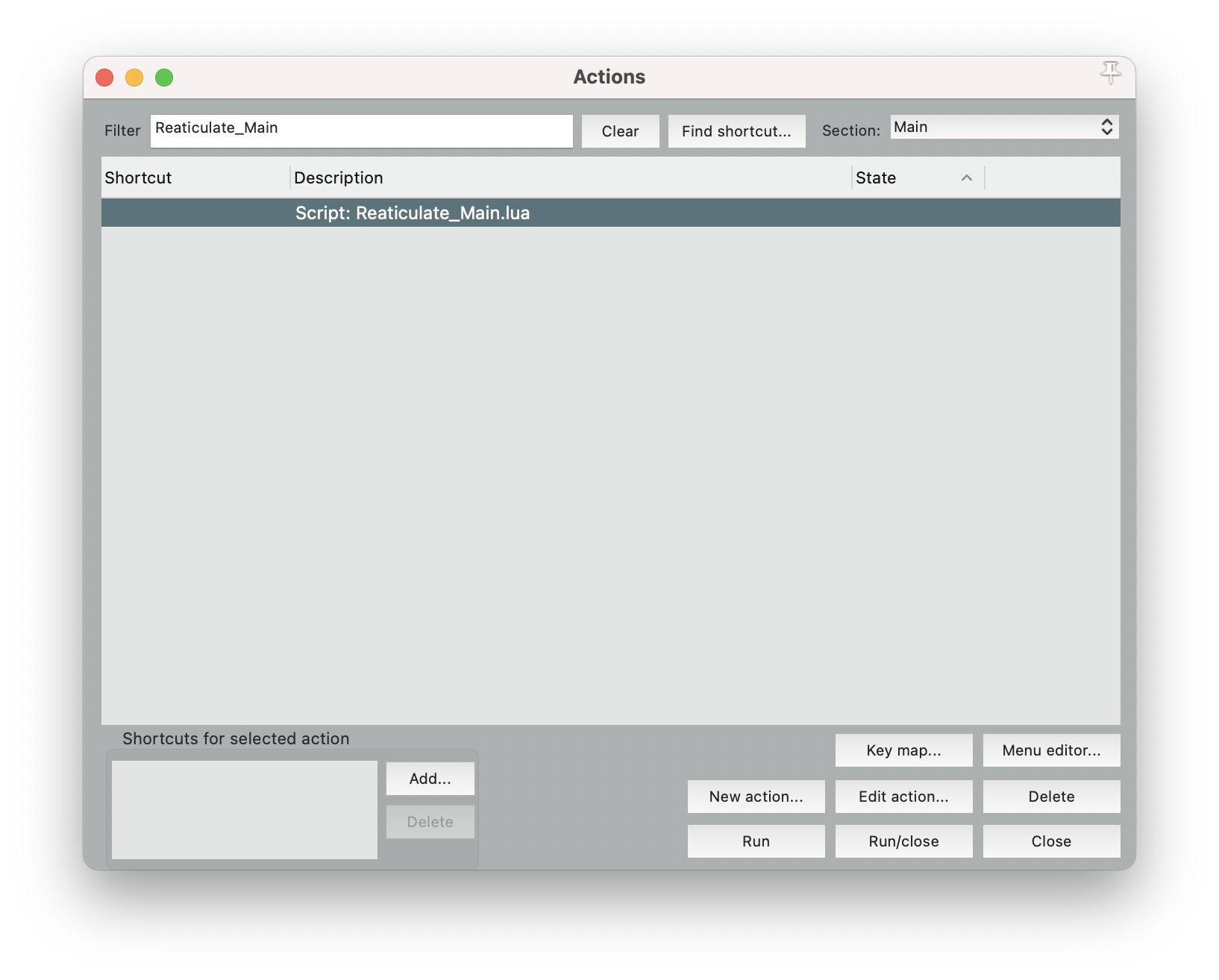
Filter the Actions List for “Reaticulate_Main”
-
Select the
Script: Reaticulate_Main.luaaction and click theRun/closebutton near the bottom right corner of theActions Listswindow.📝 Note
-
Open Reaticulate’s preference file by clicking pencil icon near the top right corner of the
Reaticulatewindow and selecting “Edit in TextEdit”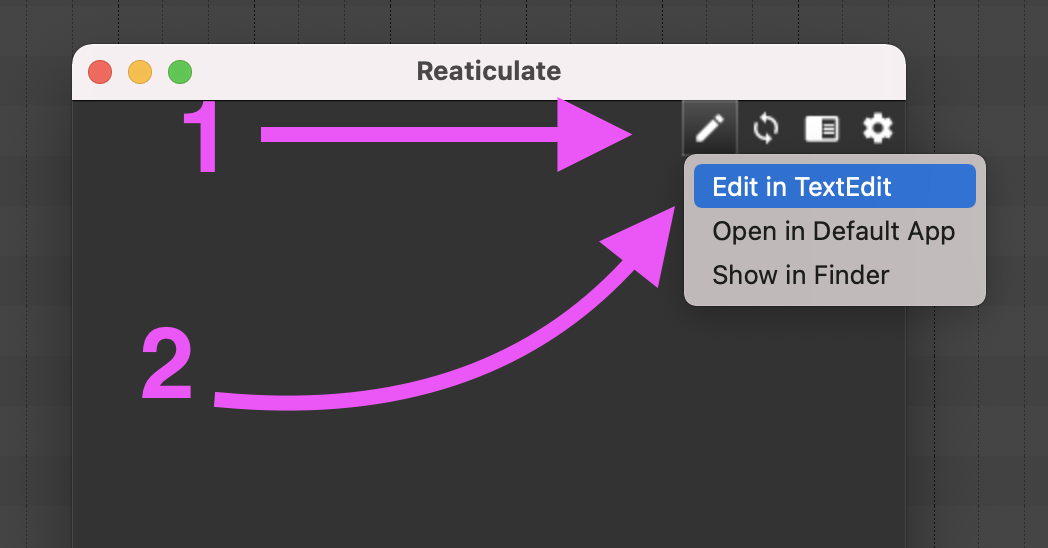
-
Finally, paste the following text into the
Reaticulate.reabankfile. Then save and close it.// ----------------------------------------------------------------------------------------------- // Spitfire BBCSO Discover Strings --------------------------------------------------------------- // ----------------------------------------------------------------------------------------------- //! colors=default=#222222 //! colors=legato=#F29559 //! colors=legato-light=#F194B4 //! colors=legato-dark=#F194B4 //! colors=long=#467599 //! colors=long-light=#F194B4 //! colors=long-dark=#9381FF //! colors=short=#84DCC6 //! colors=short-light=#F29559 //! colors=short-dark=#84DCC6 //! colors=textured=#9381FF //! colors=fx=#D81159 //! g="Spitfire/BBCSO Discover Orchestra/Strings" n="BBCSO Discover - Violins 1" //! m="Keyswitches" Bank 65 1 - "BBCSO Discover Orchestra Violins 1" //! c=myColor i=legato o=note:0 1 Legato //! c=long i=note-whole o=note:1 2 Long //! c=short i=spiccato o=note:4 3 Spiccato //! c=short-light i=pizz o=note:6 4 Pizzicato //! c=textured i=tremolo o=note:8 5 Tremolo //! g="Spitfire/BBCSO Discover Orchestra/Strings" n="BBCSO Discover - Violins 2" //! m="Keyswitches" Bank 65 2 - "BBCSO Discover Orchestra Violins 2" //! c=long i=note-whole o=note:0 1 Long //! c=short i=spiccato o=note:1 2 Spiccato //! c=short-light i=pizz o=note:2 3 Pizzicato //! c=textured i=tremolo o=note:3 4 Tremolo //! g="Spitfire/BBCSO Discover Orchestra/Strings" n="BBCSO Discover - Violas" //! m="Keyswitches" Bank 65 3 - "BBCSO Discover Orchestra Violas" //! c=long i=note-whole o=note:0 1 Long //! c=short i=spiccato o=note:1 2 Spiccato //! c=short-light i=pizz o=note:2 3 Pizzicato //! c=textured i=tremolo o=note:3 4 Tremolo //! g="Spitfire/BBCSO Discover Orchestra/Strings" n="BBCSO Discover - Celli" //! m="Keyswitches" Bank 65 4 - "BBCSO Discover Orchestra Celli" //! c=default i=note-whole o=note:0 1 Long //! c= default i=spiccato o=note:1 2 Spiccato //! c= default i=pizz o=note:2 3 Pizzicato //! c= default i=tremolo o=note:3 4 Tremolo //! g="Spitfire/BBCSO Discover Orchestra/Strings" n="BBCSO Discover - Basses" //! m="Keyswitches" Bank 65 4 - "BBCSO Discover Orchestra Basses" //! c=default i=note-whole o=note:0 1 Long //! c= default i=spiccato o=note:1 2 Spiccato //! c= default i=pizz o=note:2 3 Pizzicato // ----------------------------------------------------------------------------------------------- // Spitfire BBCSO Discover Winds ----------------------------------------------------------------- // ----------------------------------------------------------------------------------------------- //! g="Spitfire/BBCSO Discover Orchestra/Winds" n="BBCSO Discover - Piccolo" //! m="Keyswitches" Bank 65 5 - "BBCSO Discover Orchestra Piccolo" //! c=default i=note-whole o=note:0 1 Long //! c= default i=staccato o=note:1 2 Staccatissimo //! g="Spitfire/BBCSO Discover Orchestra/Winds" n="BBCSO Discover - Flutes a3" //! m="Keyswitches" Bank 65 6 - "BBCSO Discover Orchestra Flutes a3" //! c=default i=note-whole o=note:0 1 Long //! c= default i=staccato o=note:1 2 Staccatissimo //! g="Spitfire/BBCSO Discover Orchestra/Winds" n="BBCSO Discover - Oboes a3" //! m="Keyswitches" Bank 65 7 - "BBCSO Discover Orchestra Oboes a3" //! c=default i=note-whole o=note:0 1 Long //! c= default i=staccato o=note:1 2 Staccatissimo //! g="Spitfire/BBCSO Discover Orchestra/Winds" n="BBCSO Discover - Clarinets a3" //! m="Keyswitches" Bank 65 8 - "BBCSO Discover Orchestra Clarinets a3" //! c=default i=note-whole o=note:0 1 Long //! c= default i=staccato o=note:1 2 Staccatissimo //! g="Spitfire/BBCSO Discover Orchestra/Winds" n="BBCSO Discover - Bassoon a3" //! m="Keyswitches" Bank 65 9 - "BBCSO Discover Orchestra Bassoon a3" //! c=default i=note-whole o=note:0 1 Long //! c= default i=staccato o=note:1 2 Staccatissimo // ----------------------------------------------------------------------------------------------- // Spitfire BBCSO Discover Brass ----------------------------------------------------------------- // ----------------------------------------------------------------------------------------------- //! g="Spitfire/BBCSO Discover Orchestra/Brass" n="BBCSO Discover - Horns a4" //! m="Keyswitches" Bank 65 10 - "BBCSO Discover Orchestra Horns a4" //! c=default i=note-whole o=note:0 1 Long //! c= default i=staccato o=note:1 2 Staccatissimo //! g="Spitfire/BBCSO Discover Orchestra/Brass" n="BBCSO Discover - Trumpets a3" //! m="Keyswitches" Bank 65 11 - "BBCSO Discover Orchestra Trumpets a3" //! c=default i=note-whole o=note:0 1 Long //! c= default i=staccato o=note:1 2 Staccatissimo //! g="Spitfire/BBCSO Discover Orchestra/Brass" n="BBCSO Discover - Tenor Trombones a3" //! m="Keyswitches" Bank 65 12 - "BBCSO Discover Orchestra Tenor Trombones a3" //! c=default i=note-whole o=note:0 1 Long //! c= default i=staccato o=note:1 2 Staccatissimo //! g="Spitfire/BBCSO Discover Orchestra/Brass" n="BBCSO Discover - Bass Trombones a3" //! m="Keyswitches" Bank 65 13 - "BBCSO Discover Orchestra Bass Trombones a3" //! c=default i=note-whole o=note:0 1 Long //! c= default i=staccato o=note:1 2 Staccatissimo //! g="Spitfire/BBCSO Discover Orchestra/Brass" n="BBCSO Discover - Tuba" //! m="Keyswitches" Bank 65 14 - "BBCSO Discover Orchestra Tuba" //! c=default i=note-whole o=note:0 1 Long //! c= default i=staccato o=note:1 2 Staccatissimo
Reaper Template
Breathe a sigh of relief, the hard work is over and we are nearly ready to start making some sweet sweet orchestral music. Last, but not least we need to download and open the Reaper Project Template which organizes all the BBCSO Discover instrument into easily manageable groups with two dedicated reverb tracks per group.
Here is the Reaper Project Template: