Unity Roll-A-Ball Game
Unity: Roll-A-Ball Game
📝 Note
When you get to positioning the “PickUp” objects you may find the following table helpful…
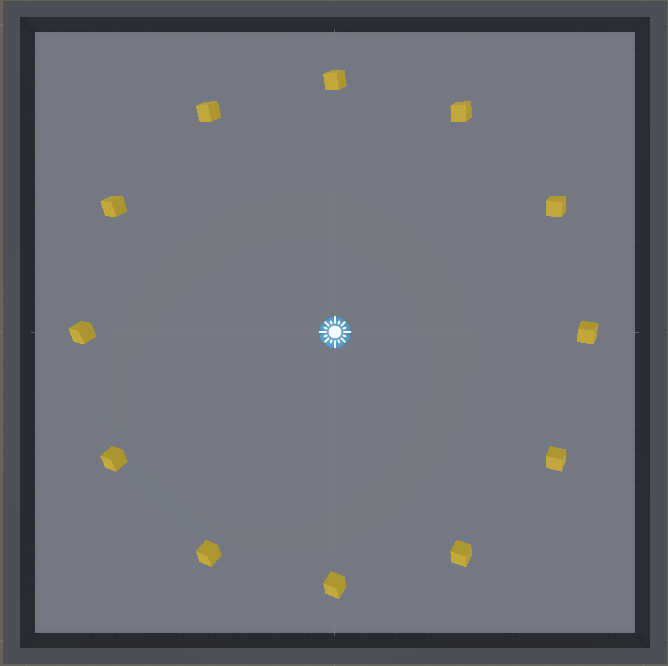
| Pick Up # | X Position | Y Position | Z Position |
|---|---|---|---|
| 1 | 4 | 0.5 | 7 |
| 2 | 7 | 0.5 | 4 |
| 3 | 8 | 0.5 | 0 |
| 4 | 7 | 0.5 | -4 |
| 5 | 4 | 0.5 | -7 |
| 6 | 0 | 0.5 | -8 |
| 7 | -4 | 0.5 | -7 |
| 8 | -7 | 0.5 | -4 |
| 9 | -8 | 0.5 | 0 |
| 10 | -7 | 0.5 | 4 |
| 11 | -4 | 0.5 | 7 |
| 12 | 0 | 0.5 | 8 |
Adding Sound
For now, I’ll just leave a version of the Roll A Ball game where I have already added sounds using several custom scripts and Unity’s default audio capabilities for you to study. In the future, I’ll come back and provide a step-by-step guide on how to replicate this project.
The script “PlayAudioClipOnImpact.cs” included in this project’s Assets/Scripts/Audio folder is a great script for you to keep for your own notes/reference. Please note that for this script to properly work, you project needs to also include all the “Editor” folder found in Assets/Scripts/.
Here is the project. It was created using Unity 2022.3.10f1