FMOD Unity C# Scripting
This page collects practical C# recipes for wiring FMOD Studio into Unity. It assumes the FMOD for Unity integration is installed, your banks are built and loaded, and that you are comfortable with basic Unity scripting (MonoBehaviours, serialized fields, and the inspector).
Scripting Basics
FMOD Namespace
Any script that references FMOD needs to declare that it is using FMOD at the top of the script.
using FMODUnity;Some recipes below also use FMOD.Studio for types like EventInstance and STOP_MODE:
using FMOD.Studio;Referencing FMOD Events
Add the following line of code to any script to expose a serialized FMOD event reference in the inspector. [SerializeField] with private keeps the field out of other scripts’ reach while still letting you assign events from the Unity editor — which is the conventional Unity pattern.
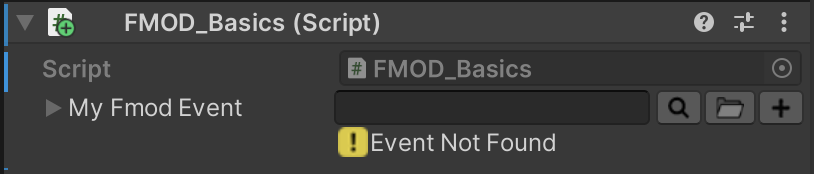
[SerializeField] // Show this variable in Unity's Inspector panel
private EventReference myFmodEvent;  // FMOD Event Reference
Triggering FMOD Events from a Script
The simplest way to trigger an event is PlayOneShot. It fires and forgets — FMOD creates the instance, plays it, and cleans it up for you.
RuntimeManager.PlayOneShot(myFmodEvent);PlayOneShot vs. CreateInstance
Use PlayOneShot for fire-and-forget sounds you will never need to modify, stop, or position — UI blips, footstep one-shots, impact transients.
Use RuntimeManager.CreateInstance when you need any of the following:
- Change parameters on the event after it starts.
- Stop the event early (looping music, ambiences, held sounds).
- Position the event in 3D space or follow a moving object.
- Listen for callbacks (marker hits, beats, timeline navigation).
CreateInstance returns an EventInstance that you are responsible for. Always call instance.release() once you are done with it so FMOD can free its resources — releasing does not stop playback, it just flags the instance to be cleaned up when it finishes.
Triggering FMOD Events via Animations
-
Add the following script to the desired game object.
using System.Linq; using UnityEngine; using FMODUnity; public class FMODAnimationEventTriggers : MonoBehaviour { [System.Serializable] public struct AnimationEventTriggers { public string eventName; public EventReference fmodEvent; } public AnimationEventTriggers[] animationEventTriggerPairs; public void FMODAnimationEventTrigger(string eventString) { AnimationEventTriggers evt = animationEventTriggerPairs.FirstOrDefault(e => e.eventName == eventString); // If the FMOD event is not null, play the FMOD event if (evt.fmodEvent.IsNull == false) // FMOD event is valid, play it { var instance = RuntimeManager.CreateInstance(evt.fmodEvent); instance.set3DAttributes(FMODUnity.RuntimeUtils.To3DAttributes(gameObject)); instance.start(); instance.release(); } } } -
Populate the
animationEventTriggerPairsarray in the inspector and assign a unique string to each event. -
Add an Animation Event to the animation timeline.
-
Call the
FMODAnimationEventTriggerfunction and pass it the same string as given to the corresponding FMOD event on the script. -
Target the game object that is being animated and that the FMOD event should originate from.
set3DAttributes only sets the position once, at the moment the event starts. For a short one-shot that is fine. If the event is long and the object is moving, use RuntimeManager.AttachInstanceToGameObject(instance, transform) instead — FMOD will keep the instance’s position and velocity in sync with the GameObject until the event ends.
Controlling FMOD Parameters
The two recipes below use RuntimeManager.StudioSystem.setParameterByName, which sets a global parameter that applies to every instance of every event. That is the right choice for things like master volume, time-of-day, or an accessibility toggle. If you want to change a parameter on a single event instance (for example, an engine RPM on one specific car), call setParameterByName on the EventInstance itself instead.
Controlling FMOD Parameters via Sliders in Unity
using UnityEngine;
using UnityEngine.UI;
using FMODUnity;

public class FMODSliderParameterControl : MonoBehaviour
{
    // A struct to hold the slider and its corresponding FMOD parameter name.
    [System.Serializable]
    public struct SliderParameterPair
    {
        public Slider soundSlider;
        public string fmodParameterName;
    }

    // Array of SliderParameterPair - each element represents a slider and its corresponding FMOD parameter.
    public SliderParameterPair[] sliderParameterPairs;

    void Start()
    {
        // For each SliderParameterPair in the array, initialize the FMOD parameter and set up the listener for the slider's onValueChanged event.
        foreach (var pair in sliderParameterPairs)
        {
            // Initialize the FMOD parameter with the initial value of the Slider.
            RuntimeManager.StudioSystem.setParameterByName(pair.fmodParameterName, pair.soundSlider.value);

            // Setup the action to be performed whenever the Slider value changes.
            pair.soundSlider.onValueChanged.AddListener((value) => UpdateFMODParameterValue(value, pair.fmodParameterName));
        }
    }

    // A function to update the FMOD parameter value.
    void UpdateFMODParameterValue(float sliderValue, string parameterName)
    {
        RuntimeManager.StudioSystem.setParameterByName(parameterName, sliderValue);
    }
}
Controlling an FMOD Parameter via a Toggle in Unity
using UnityEngine;
using UnityEngine.UI;
using FMODUnity;

public class FMODToggleParameterControl : MonoBehaviour
{
    [System.Serializable]
    public struct ToggleParameterPair
    {
        public Toggle audioToggle;
        public string fmodParameterName;
    }

    public ToggleParameterPair[] toggleParameterPairs;

    void Start()
    {
        foreach (var pair in toggleParameterPairs)
        {
            // Initialize the FMOD parameter with the initial value of the Toggle.
            RuntimeManager.StudioSystem.setParameterByName(pair.fmodParameterName, pair.audioToggle.isOn ? 1.0f : 0.0f);

            // Setup the action to be performed whenever the Toggle value changes.
            pair.audioToggle.onValueChanged.AddListener((value) => UpdateFMODParameterValue(value, pair.fmodParameterName));
        }
    }

    // A function to update the FMOD parameter value.
    void UpdateFMODParameterValue(bool toggleValue, string parameterName)
    {
        // Set FMOD parameter to 1 if Toggle is on, and 0 if off.
        RuntimeManager.StudioSystem.setParameterByName(parameterName, toggleValue ? 1.0f : 0.0f);
    }
}
FMOD Mixer Snapshots
Snapshots are a special type of FMOD event that apply a saved mixer state — volume changes, effects, send routing, and bus properties — while they are running, and revert when stopped. A “Paused” snapshot that ducks the game bus while a menu is open, or an “Underwater” snapshot that applies a low-pass filter when the player submerges, are common use cases.
Snapshots are scripted using the same EventInstance API as regular events, with two important differences:
- Their paths use the
snapshot:/prefix instead ofevent:/. - You almost always want to hold on to the instance and call
stop()later, rather than usingPlayOneShot. A snapshot only has an effect while it is running.
Applying and Reverting a Snapshot
Store the EventInstance on a field so you can revert the snapshot when the triggering state ends. STOP_MODE.ALLOWFADEOUT honors the snapshot’s own release time, producing a smooth transition back to the unsnapshotted mix — prefer it over STOP_MODE.IMMEDIATE unless you specifically want an abrupt cut.
You can assign a snapshot to an EventReference field the same way you assign an event — just drag the snapshot from the FMOD event browser into the inspector slot.
using UnityEngine;
using FMOD.Studio;
using FMODUnity;

public class PauseSnapshotController : MonoBehaviour
{
    [SerializeField] private EventReference pauseSnapshot;

    private EventInstance snapshotInstance;

    public void ApplyPauseSnapshot()
    {
        snapshotInstance = RuntimeManager.CreateInstance(pauseSnapshot);
        snapshotInstance.start();
    }

    public void RevertPauseSnapshot()
    {
        snapshotInstance.stop(STOP_MODE.ALLOWFADEOUT);
        snapshotInstance.release();
    }
}
Blending a Snapshot with Intensity
Snapshots can be applied partially — a pause duck can be faded in over a second, or an underwater filter can deepen as the player sinks. In FMOD Studio, automate the snapshot’s intensity macro to a parameter (commonly named Intensity), then drive that parameter from code:
// value is typically in the 0.0–1.0 range configured on the snapshot parameter.
// The snapshot instance must be started before parameter changes take effect.
snapshotInstance.setParameterByName("Intensity", value);
Cleanup
Snapshots count against FMOD’s instance budget just like regular events. Release the instance once you are finished with it (or when the owning GameObject is destroyed) so FMOD can reclaim it:
void OnDestroy()
{
    if (snapshotInstance.isValid())
    {
        snapshotInstance.stop(STOP_MODE.IMMEDIATE);
        snapshotInstance.release();
    }
}
Related
- FMOD Survival Shooter Unity Integration — these recipes applied step by step to a real game
- Unity + FMOD: The Survival Game — the project brief
- Basic Audio Scripting in Unity with C# — Unity’s built-in audio, before middleware
- FMOD for Unity documentation