LightPadSynth_en
Visit Resource →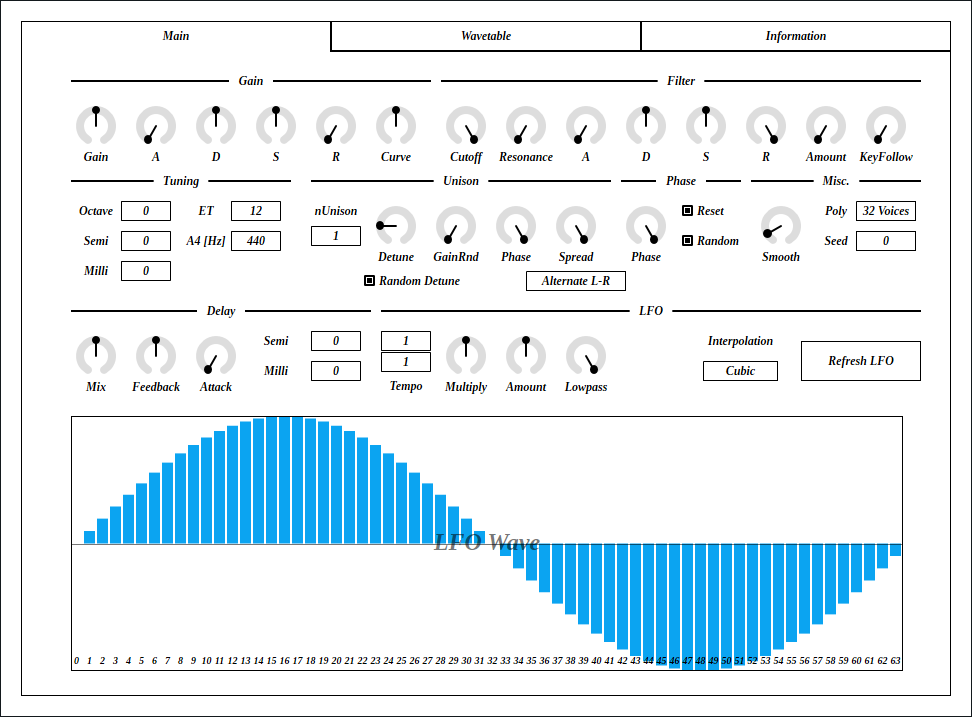

LightPadSynth is a lightweight version of CubicPadSynth. For efficiency, interpolation is changed to linear. Also pitch modulation is omitted. Instead, a delay is added for each voice.
LightPadSynth requires CPU which supports AVX or later SIMD instructions.
The package includes following builds:
- Windows 64bit
- Linux 64bit
- macOS 64bit
macOS build isn’t tested because I don’t have Mac. If you found a bug, please file a issue to GitHub repository or send email to ryukau@gmail.com.
Linux build is built on Ubuntu 18.0.4 and tested on Bitwig and Reaper. If you are using distribution other than Ubuntu 18.04, plugin will not likely run. In this case, please take a look at build instruction.
Installation
Plugin
Place *.vst3 directory to:
/Program Files/Common Files/VST3/for Windows.$HOME/.vst3/for Linux./Users/$USERNAME/Library/Audio/Plug-ins/VST3/for macOS.
DAW may provides additional VST3 directory. For more information, please refer to the manual of the DAW.
Presets
Extract preset zip, then place preset directory to the OS specific path:
- Windows :
/Users/$USERNAME/Documents/VST3 Presets/Uhhyou - Linux :
$HOME/.vst3/presets/Uhhyou - macOS :
/Users/$USERNAME/Library/Audio/Presets/Uhhyou
Preset directory name must be the same as the plugin. Make Uhhyou directory if it does not exist.
Windows Specific
If DAW doesn’t recognize the plugin, try installing C++ redistributable (vc_redist.x64.exe). Installer can be found in the link below.
Linux Specific
On Ubuntu 18.0.4, those packages are required.
sudo apt install libxcb-cursor0 libxkbcommon-x11-0If DAW doesn’t recognize the plugin, take a look at Package Requirements section of the link below and make sure all the VST3 related package is installed.
REAPER on Linux may not recognize the plugin. A workaround is to delete a file ~/.config/REAPER/reaper-vstplugins64.ini and restart REAPER.
macOS Specific
When trying to run plugin first time, following message may appear on macOS.
<PluginName>.vst3 is damaged and can't be opened. You should move it to
the Trash"
In this case, open terminal and try running following command to unzipped .vst3 directory.
xattr -rc /path/to/PluginName.vst3Plugin may be considered as unsigned/un-notarized application. In this case, try following the steps below.
- Open terminal and run
sudo spctl --master-disable. - Go to System Preferences → Security and Privacy → General → Allow apps downloaded from, then select “Anywhere”.
Beware that steps above degrades security of your system. To revert the settings, follow the steps below.
- Go to System Preferences → Security and Privacy → General → Allow apps downloaded from, then select option to “App Store and identified developers”.
- Open terminal and run
sudo spctl --master-enable.
Reference
Color Configuration
At first time, create color config file to:
/Users/USERNAME/AppData/Roaming/UhhyouPlugins/style/style.jsonon Windows.$XDG_CONFIG_HOME/UhhyouPlugins/style/style.jsonon Linux.- If
$XDG_CONFIG_HOMEis empty, make$HOME/.config/UhhyouPlugins/style/style.json.
- If
/Users/$USERNAME/Library/Preferences/UhhyouPlugins/style/style.jsonon macOS.
Below is a example of style.json.
Hex color codes are used.
- 6 digit color is RGB.
- 8 digit color is RGBA.
First letter # is conventional. Plugins ignore the first letter of color code, thus ?102938, \n11335577 are valid.
Do not use characters outside of 0-9a-f for color value.
fontPath: Absolute path to *.ttf font file. Not implemented in VST 3 version.foreground: Text color.foregroundButtonOn: Text color of active toggle button. Recommend to use the same value offoregroundorboxBackground.foregroundInactive: Text color of inactive components. Currently, only used for TabView.background: Background color.boxBackground: Background color of inside of box shaped components (Barbox, Button, Checkbox, OptionMenu, TextKnob, VSlider).border: Border color of box shaped components.borderCheckbox: Border color of CheckBox.borderLabel: Line color of parameter section label.unfocused: Color to fill unfocused components. Currently, only used for knobs.highlightMain: Color to indicate focus is on a component. Highlight colors are also used for value of slider components (BarBox and VSlider).highlightAccent: Same ashighlightMain. Used for cosmetics.highlightButton: Color to indicate focus is on a button.highlightWarning: Same ashighlightMain, but only used for parameters which requires extra caution.overlay: Overlay color. Used to overlay texts and indicators.overlayHighlight: Overlay color to highlight current focus.
Controls
Knob and slider can do:
- Ctrl + Left Click: Reset value.
- Shift + Left Drag: Fine adjustment.
There is an additional control for number sliders used for Octave, Seed etc.
- Middle Click : Flip minimum and maximum.
Control with many blue vertical bars (BarBox) have some keyboard shortcuts. LFO Wave on Main tab and Gain, Width, Pitch, Phase on Wavetable tab are using BarBox. Shortcuts are enabled after left clicking BarBox and mouse cursor is on the inside of BarBox. Cheat sheet is available on Infomation tab.
Snapping is not available for all BarBox. If you’d like to have snapping for certain BarBox, feel free to open issue to GitHub repository.
Edit One Bar with Shift + Right Drag holds a bar under the cursor when mouse right button is pressed. Then only changes that one bar while holding down mouse right button.
Toggle Lock with Ctrl + Shift + Right Drag behaves as line edit. When right mouse button (RMB) is pressed, it holds the opposite state of the bar below mouse cursor, then use the state for the rest of bars. For example, if RMB is pressed on a locked bar, dragging unlocks bars while holding down RMB.
Some BarBox has scroll bar to zoom in. Scroll bar has handles on left end and right end. To control zoom, use Left Drag on one of the handle. Scroll bar also has following controls:
- Right Click : Reset zoom.
- Mouse Wheel : Zoom in/out.
Caution
Pressing Refresh LFO or Refresh Table button stop sound. They also stop all midi notes.
Wavetable Specification
128 wavetables are generated. The number 128 comes from MIDI note number range. The indices of wavetables correspond to MIDI note numbers.
When tuning is not exact, an index will be truncated to semitones. For example, if MIDI note number is 60 and tuning is -20 cents, index becomes floor(60 - 0.20) = 59. Thus, 59th wavetable will be used.
Block Diagram
If the image is small, use Ctrl + Mouse Wheel or “View Image” on right click menu to scale.
Diagram only shows overview. It’s not exact implementation.

Parameters
Main Tab
Gain
Lowpass
Naive 3-pole low-pass filter.
Tuning
Unison
Phase
Misc.
Delay
LFO
Wavetable Tab

Overtone Controls
Pitch
Spectrum


Phase
Random
BufferSize
Size of a wavetable. The power of 2 values can be selected from 2^10 to 2^21.
The value inside parentheses indicates number of bytes in a sum of all wavetables. A number of bytes is calculated with following equation.
bytes = 4 * 128 * BufferSizeModifier
Refresh Table
Refresh PADsynth wavetable based on current configuration of Wavetable tab.
Note that refreshing wavetable stops sound. It also interrupts MIDI notes.
Change Log
- 0.1.7
- Implemented process context requirements.
- Added/Changed BarBox functionality to match LV2 version.
- Edit one bar.
- Lock.
- Internal mouse wheel sensitivitly.
- Snapping (implemented, but not used).
- Starting bar of line edit is now fixed to anchor point.
- 0.1.6
- Added check that DSP is initialized or not.
- 0.1.5
- Added scroll bar to dense BarBox.
- Added undo/redo to BarBox.
- 0.1.4
- Added color configuration.
- 0.1.3
- Reverted parameter smoother to the old one which works with variable size audio buffer.
- 0.1.2
- Fixed a bug that refreshing wavetable before parameters are loaded at launch.
- Fixed off by one error in LFO wavetable with cubic interpolation.
- 0.1.1
- Fixed Refresh LFO button and Refresh Table button from VST message to VST parameter.
- 0.1.0
- Initial release.
Old Versions
License
LightPadSynth is licensed under GPLv3. Complete licenses are linked below.
If the link above doesn’t work, please send email to ryukau@gmail.com.
About VST
VST is a trademark of Steinberg Media Technologies GmbH, registered in Europe and other countries.