IterativeSinCluster_en
Visit Resource →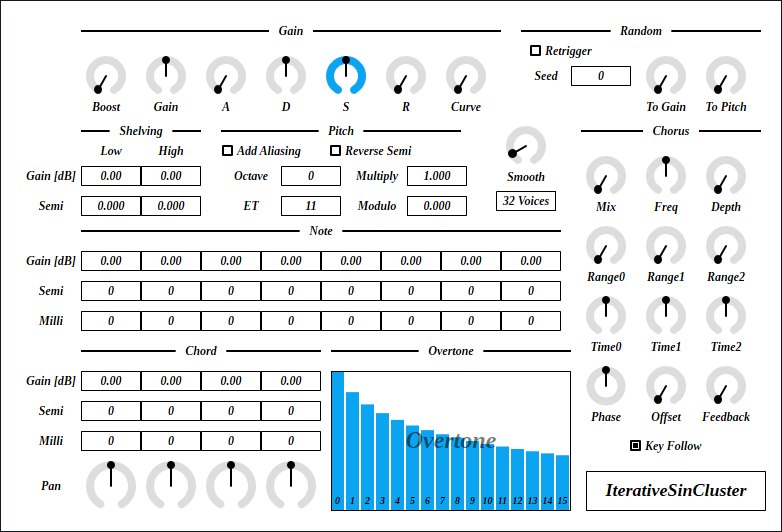

IterativeSinCluster is an additive synthesizer. This synth computes 512 sine waves for each note to make tone cluster. I somehow thought “iterative sin” is a valid term. Correct term is “recursive sine”.
IterativeSinCluster requires CPU which supports AVX or later SIMD instructions.
The package includes following builds:
- Windows 64bit
- Linux 64bit
- macOS 64bit
macOS build isn’t tested because I don’t have Mac. If you found a bug, please file a issue to GitHub repository or send email to ryukau@gmail.com.
Linux build is built on Ubuntu 18.0.4 and tested on Bitwig and Reaper. If you are using distribution other than Ubuntu 18.04, plugin will not likely run. In this case, please take a look at build instruction.
Installation
Plugin
Place *.vst3 directory to:
/Program Files/Common Files/VST3/for Windows.$HOME/.vst3/for Linux./Users/$USERNAME/Library/Audio/Plug-ins/VST3/for macOS.
DAW may provides additional VST3 directory. For more information, please refer to the manual of the DAW.
Presets
Extract preset zip, then place preset directory to the OS specific path:
- Windows :
/Users/$USERNAME/Documents/VST3 Presets/Uhhyou - Linux :
$HOME/.vst3/presets/Uhhyou - macOS :
/Users/$USERNAME/Library/Audio/Presets/Uhhyou
Preset directory name must be the same as the plugin. Make Uhhyou directory if it does not exist.
Windows Specific
If DAW doesn’t recognize the plugin, try installing C++ redistributable (vc_redist.x64.exe). Installer can be found in the link below.
Linux Specific
On Ubuntu 18.0.4, those packages are required.
sudo apt install libxcb-cursor0 libxkbcommon-x11-0If DAW doesn’t recognize the plugin, take a look at Package Requirements section of the link below and make sure all the VST3 related package is installed.
REAPER on Linux may not recognize the plugin. A workaround is to delete a file ~/.config/REAPER/reaper-vstplugins64.ini and restart REAPER.
macOS Specific
When trying to run plugin first time, following message may appear on macOS.
<PluginName>.vst3 is damaged and can't be opened. You should move it to
the Trash"
In this case, open terminal and try running following command to unzipped .vst3 directory.
xattr -rc /path/to/PluginName.vst3Plugin may be considered as unsigned/un-notarized application. In this case, try following the steps below.
- Open terminal and run
sudo spctl --master-disable. - Go to System Preferences → Security and Privacy → General → Allow apps downloaded from, then select “Anywhere”.
Beware that steps above degrades security of your system. To revert the settings, follow the steps below.
- Go to System Preferences → Security and Privacy → General → Allow apps downloaded from, then select option to “App Store and identified developers”.
- Open terminal and run
sudo spctl --master-enable.
Reference
Color Configuration
At first time, create color config file to:
/Users/USERNAME/AppData/Roaming/UhhyouPlugins/style/style.jsonon Windows.$XDG_CONFIG_HOME/UhhyouPlugins/style/style.jsonon Linux.- If
$XDG_CONFIG_HOMEis empty, make$HOME/.config/UhhyouPlugins/style/style.json.
- If
/Users/$USERNAME/Library/Preferences/UhhyouPlugins/style/style.jsonon macOS.
Below is a example of style.json.
Hex color codes are used.
- 6 digit color is RGB.
- 8 digit color is RGBA.
First letter # is conventional. Plugins ignore the first letter of color code, thus ?102938, \n11335577 are valid.
Do not use characters outside of 0-9a-f for color value.
fontPath: Absolute path to *.ttf font file. Not implemented in VST 3 version.foreground: Text color.foregroundButtonOn: Text color of active toggle button. Recommend to use the same value offoregroundorboxBackground.foregroundInactive: Text color of inactive components. Currently, only used for TabView.background: Background color.boxBackground: Background color of inside of box shaped components (Barbox, Button, Checkbox, OptionMenu, TextKnob, VSlider).border: Border color of box shaped components.borderCheckbox: Border color of CheckBox.borderLabel: Line color of parameter section label.unfocused: Color to fill unfocused components. Currently, only used for knobs.highlightMain: Color to indicate focus is on a component. Highlight colors are also used for value of slider components (BarBox and VSlider).highlightAccent: Same ashighlightMain. Used for cosmetics.highlightButton: Color to indicate focus is on a button.highlightWarning: Same ashighlightMain, but only used for parameters which requires extra caution.overlay: Overlay color. Used to overlay texts and indicators.overlayHighlight: Overlay color to highlight current focus.
Controls
Knob and slider can do:
- Ctrl + Left Click: Reset value.
- Shift + Left Drag: Fine adjustment.
Additionally, number sliders use in Gain, Semi etc. can do:
- Wheel Click: Toggle Min/Max.
Overtone has following controls:
- Ctrl + Left Drag: Reset to Default
- Mouse Wheel Drag: Draw Line
Block Diagram
If the image is small, use Ctrl + Mouse Wheel or “View Image” on right click menu to scale.
Diagram only shows overview. It’s not exact implementation.

Parameters
Gain
Shelving
Cutoff freqeuncy can be changed by Semi, which is relative to a note frequency. For example, if the note is C4 and Semi is 12.000, cutoff frequency is set to C4 + 12 semitone = C5.
Lowshelving changesGainof sine waves less than or equal to the cutoff frequency specified bySemi.Highshelving changesGainof sine waves greater than or equal to the cutoff frequency specified bySemi.
Pitch
Smooth
Time length to change some parameter value to current one. Unit is in second.
List of parameters related to Smooth. * represents wild card.
- All parameters in
Gainsection. Chord.Pan- All parameters in
Chorussection, exceptKey Follow.
Other parameter uses the value obtained from the timing of note-on for entire duration of a note.
nVoice
Maximum polyphony. Lowering the number of this option reduces CPU load.
Random
Note, Chord, Overtone
Change sine wave gain and pitch.
1 Note have 16 Overtone. 1 Chord consists of 8 Note. 4 Chord are available to use.
Common parameters for Note and Chord.
Gain: Sine wave gain.Semi: Distance from note frequency. Unit is semitone.Milli: Distance from note frequency. Unit is 1 / 1000 semitone, or 1 / 10 cent.
Leftmost of Overtone is gain of fundamental frequency (1st overtone) of a note. For each bar from left represents 1st, 2nd, 3rd, … , 16th overtone gain.
Below is the summary of calculation of sine wave frequency.
function toneToPitch(semi, milli):
  return 2 ^ (1000 * semi + milli) / (ET * 1000)

for each Chord:
  chordPitch = toneToPitch(Chord.semi, Chord.milli)
  for each Note:
    notePitch = toneToPitch(Note.semi, Note.milli)
    for each Overtone:
      frequency = midiNoteFrequency
        * (1 + mod(Multiply * Overtone * notePitch * chordPitch, Modulo))
Chorus
Change Log
- 0.1.11
- Implemented process context requirements.
- 0.1.10
- Added check that DSP is initialized or not.
- 0.1.9
- Added undo/redo to BarBox.
- 0.1.8
- Added color configuration.
- 0.1.7
- Reverted parameter smoother to the old one which works with variable size audio buffer.
- Enabled pitch bend.
- 0.1.6
- Changed BarBox shortcuts to be disabled when mouse cursor is on the outside of BarBox.
- 0.1.5
- Fixed a bug that cause crash when drawing string.
- 0.1.4
- Changed display method for pop-up which shows up by clicking plugin title.
- 0.1.3
- Fixed a bug that was causing noise on PreSonus Studio One 4.6.1.
- 0.1.2
- Enabled GUI for Linux build.
- 0.1.1
- Fixed macOS build.
- Added code paths for AVX and AVX512 instructions.
- Fixed wobbling knob bug.
- 0.1.0
- Initial release.
Old Versions
- IterativeSinCluster 0.1.10 - VST 3 (github.com)
- IterativeSinCluster 0.1.9 - VST 3 (github.com)
- IterativeSinCluster 0.1.8 - VST 3 (github.com)
- IterativeSinCluster 0.1.7 - VST 3 (github.com)
- IterativeSinCluster 0.1.6 - VST 3 (github.com)
- IterativeSinCluster 0.1.5 - VST 3 (github.com)
- [IterativeSinCluster 0.1.3 - VST 3 (github.com)](https://github.com/ryukau/VSTPlugins/releases/download/EsPhaser0.1.0/IterativeSinCluster0.1.3.zip
- IterativeSinCluster 0.1.2 - VST 3 (github.com)
- IterativeSinCluster 0.1.1 - VST 3 (github.com)
- IterativeSinCluster 0.1.0 - VST 3 (github.com)
License
IterativeSinCluster is licensed under GPLv3. Complete licenses are linked below.
If the link above doesn’t work, please send email to ryukau@gmail.com.
About VST
VST is a trademark of Steinberg Media Technologies GmbH, registered in Europe and other countries.