Audec » Spread Delay Lite
Visit Resource →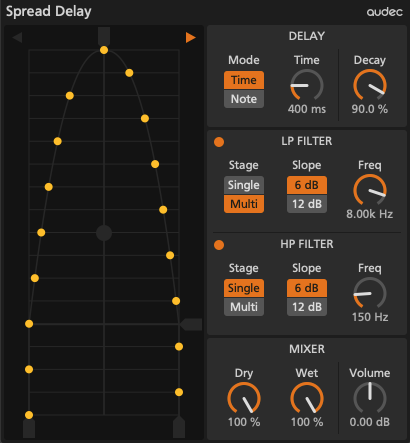


Spread Delay is a ping-pong style multi-tap delay effect. It produces delayed sounds that gradually spread from the center to the left and right.
- Scope
- The yellow points show the pan position of each dry and delayed sounds. The top yellow point shows the dry sound, and the 16 points below it show the 1st to 16th delayed sounds in order.
- Two arrows in the upper left and right select whether the delayed sounds start from the left or right.
- The slider on the top adjusts the pan position of the dry sound.
- The slider on the right adjusts when the delayed sounds spread to its maximum width.
- The two sliders on the bottom respectively adjust the maximum width of the left and right side.
- The circle in the middle adjusts the curve of how the delayed sounds spread to the left and right. To adjust the curve, drag the circle vertically.
- To reset the slider or circle position, double-click the slider or circle.
- Delay Section
- In the Delay section, you can adjust the delay time and decay rate.
- The Mode chooser selects between two delay time modes, Time and Note.
- In Time mode, the Time knob sets delay time in milliseconds.
- In Note mode, the Note chooser sets delay time in note length.
- The Decay knob adjusts the amplitude of the delayed signal that is sent to the next delay line.
- Filter Section
- In the filter section, there are two types of filters, low pass and high pass those are applied to the delayed signal. You can adjust them individually.
- The round button at the top left toggles the filter on or off.
- The Stage chooser selects between two filter stage types, single-stage or multi-stage.
- The Slope chooser selects between two filter slope types, 6dB/Octave(1 Pole) or 12dB/Octave(2 Pole).
- The Freq knob adjusts the cutoff frequency.
- Mixer Section
- In the Mixer section, you can adjust the balance between the dry signal and delayed signal, and the output level.
- The Dry knob adjusts the amplitude of the dry signal.
- The Wet knob adjusts the amplitude of the delayed signal.
- The Volume knob adjusts the output level.

- 2021.02.02 – Spread Delay / Lite – Ver. 1.0.4 (Mac)
- Apple Silicon support
- 2019.11.12 – Spread Delay / Lite – Ver. 1.0.3 (Windows)
- Fixed the loading issue
- Initial Release for Windows
- 2019.10.15 – Spread Delay / Lite – Ver. 1.0.1 (Mac)
- 2019.10.04 – Spread Delay Lite – Ver. 1.0.0 (Mac)
- Initial Release for Mac
- 2019.10.02 – Spread Delay – Ver. 1.0.0 (Mac)
- Initial Release for Mac